
Claude Skills for Writers: Build a Reusable Writing Skill
Skills let Claude load your house style, briefs and checklists only when a task needs them. What they are, who can use them, and how to build a SKILL.md from your best work.
If you paste the same style guide, banned-phrase list and "please keep the intro short" note into Claude every time you start a draft, a Skill is the feature built for that job. You write those instructions down once, as a small folder, and Claude pulls them in only when a task needs them.
Skills launched in October 2025, and they are getting a second wave of attention this month: Forbes ran an explainer on what they mean for businesses on 21 October 2026, and "build a skill from your best work" tutorials are trending on YouTube this week. This guide is the writer's version: what a skill is, when it beats a normal prompt, and how to build one for your own content workflow, with a working SKILL.md you can adapt.
The Short Answer
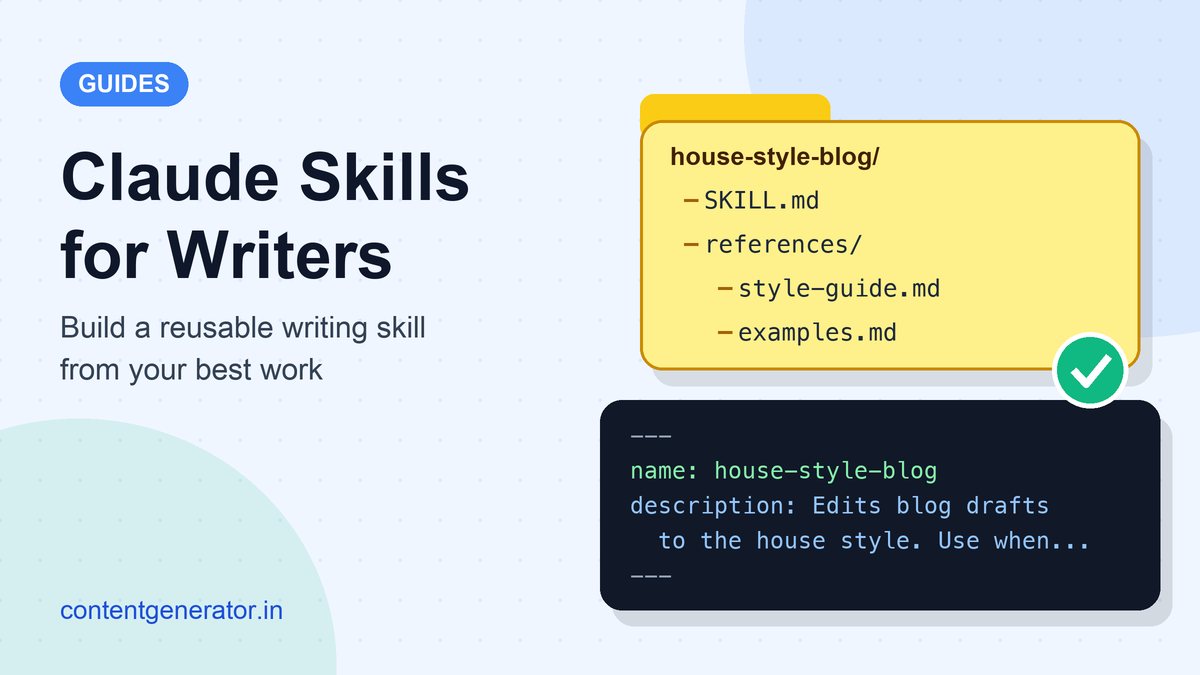
A Claude Skill is a folder with a file called SKILL.md inside. The file starts with a short header holding a name and a description, followed by plain Markdown instructions. Claude keeps only the name and description in view until a request matches the description; then it reads the full instructions and any extra files you bundled, such as a style guide or sample articles. For writers, that makes skills the right home for anything you repeat: house style, a brief format, an editing checklist, a client's tone of voice. One-off requests still belong in a normal prompt.
Skills vs Prompts, Projects and Custom Instructions
Claude now has several places to put instructions, and they overlap enough to be confusing. Anthropic's own documentation draws the lines like this:
- A prompt is for one conversation. Anthropic's developer docs describe prompts as conversation-level instructions for one-off tasks, while skills load on demand so you don't have to repeat the same guidance across conversations.
- Projects hold background knowledge that is always loaded when you chat inside that project. Skills activate only when they are needed and work across Claude, not just inside one project.
- Custom instructions apply to every conversation. Skills are task-specific, which suits a workflow like "edit this draft to our house style" that you don't want switched on all the time.
- Connectors (MCP) give Claude access to outside tools and data. Skills teach it how to do a task. The two work together: a connector might fetch a draft from your documents, and a skill tells Claude how to edit it.
A useful rule of thumb: if you have pasted the same instructions into three or more chats, they probably belong in a skill.
Who Can Use Skills (October 2026)
According to Anthropic's help centre, skills are available on the Free, Pro, Max, Team and Enterprise plans, and they need code execution and file creation to be switched on, because Claude reads skill files from a sandboxed file system. Skills also work in Claude Code and, in beta, through the API with the code execution tool.
- Individual plans: turn on code execution in Settings > Capabilities, then manage skills in Customize > Skills.
- Team and Enterprise: an owner controls skills under Organization settings > Plugins & skills. Owners can provision skills for everyone and decide whether members may share their own skills with colleagues.
Anthropic also ships ready-made skills for Word, Excel, PowerPoint and PDF files, which Claude uses automatically when you ask for one of those documents. Plan names and menu labels change, so check the help centre if your screen looks different.
What Goes Inside a Writing Skill
Anthropic's docs describe three levels of content, each loaded at a different moment:
- Metadata (always loaded). The
nameanddescriptionat the top of SKILL.md. This costs very little context, which is why you can install many skills at once. The description is what Claude matches your request against, so it decides whether your skill ever gets used. - Instructions (loaded when the skill triggers). The body of SKILL.md: your workflow, rules and output format.
- Resources (loaded only when referenced). Extra files in the folder, such as a full style guide, approved examples or a brief template.
For a blog house-style skill, a sensible folder looks like this:
house-style-blog/
├── SKILL.md              (when to use it + the editing steps)
├── references/
│   ├── style-guide.md    (spelling, tone, banned phrases)
│   └── examples.md       (approved openings and endings)
└── assets/
    └── brief-template.md
That layout follows the open Agent Skills specification at agentskills.io, which Anthropic published as an open standard in December 2025 so the same folder can work in other tools that adopt it.
How to Build One From Your Best Work
The quickest route to a good skill is not writing rules from a blank page. Start from work you already like and write down what makes it good. That "reverse engineer it" approach is what several of this week's tutorials recommend, and it maps neatly onto Anthropic's own advice.
1. Pick one repeatable job
Anthropic's guide to custom skills says the best ones solve a specific, repeatable task and focus on one workflow rather than trying to do everything. "Edit a first draft to our blog house style" is a good skill. "Help with all my writing" is not.
2. Collect your evidence
Gather three pieces you are proud of and, if you can, the edits you make to almost every draft. The patterns in those edits (shorter intros, no rhetorical questions, Indian English spelling, numbers as digits) are your rules. You can give the published pieces to Claude and ask it to list the conventions they share, then delete anything you don't actually care about.
3. Write the description like a search query
The description has to say what the skill does and when to use it, using the words you would naturally type. Anthropic's best-practice guide says to write it in the third person ("Edits blog drafts…", not "I can help you…"). The open specification allows up to 1,024 characters, but Anthropic's help article for skills uploaded to claude.ai lists a 200-character limit, so keeping it under 200 is the safe choice.
4. Keep the instructions short
Anthropic's authoring guide opens with "concise is key" and tells you to assume Claude is already capable, adding only what it would not otherwise know. It recommends keeping the SKILL.md body under 500 lines, moving long material such as a full style guide into separate files, and linking those files directly from SKILL.md rather than from other reference files. It also asks for consistent terminology: pick "draft" or "article" and stick with it.
5. Show, don't just tell
Two short before-and-after examples teach tone better than a paragraph of adjectives. Put them in references/examples.md and point to that file from the instructions.
6. Package and upload
On claude.ai, zip the folder, open Customize > Skills, click "+", choose Create skill, then Upload a skill. If you would rather not handle files, Anthropic's built-in "skill-creator" skill asks about your workflow in conversation and builds the folder for you. In Claude Code you create the folder directly instead of uploading a ZIP.
7. Test it on real drafts
Run three real drafts through it and check two things: did the skill trigger without you naming it, and did the output follow the rules? If it didn't trigger, rewrite the description using the words you actually typed. If it triggered but drifted, tighten the instruction it ignored. Anthropic also suggests testing with every model you plan to use, since a faster model may need more guidance than a larger one.
Example SKILL.md for a Blog House Style
---
name: house-style-blog
description: Edits blog drafts to the house style (plain Indian English, short intros, sourced claims, no hype words). Use when asked to edit, polish or style-check a blog post.
---

# House style editing

## Steps
1. Read references/style-guide.md before editing.
2. Cut the intro to three sentences or fewer. The first
   sentence must answer the reader's question.
3. Mark every number, price or date without a source as [CHECK].
4. Replace any phrase from the banned list in the style guide.
5. Keep the writer's structure and headings unless asked otherwise.

## Output
Return the edited draft, then a list titled "Changes"
(eight bullets at most) and a list titled "To check".

## Examples
See references/examples.md for approved openings.
The description is 164 characters, says both what the skill does and when to use it, and contains the words a writer would actually use ("edit", "polish", "blog post"). The name uses only lowercase letters and hyphens, as the open specification requires, and it avoids "claude" and "anthropic", which Anthropic's docs list as reserved words for skill names.
Mistakes That Make Skills Useless
- Vague descriptions. Anthropic's guide gives "Helps with documents" as the kind of description to avoid. If Claude can't tell when to use a skill, it won't use it.
- One giant skill. A skill that covers briefs, drafting, editing, SEO and social captions loads a lot of text for every task. Split it into focused skills; Claude can combine several on one job.
- Facts that go stale. Prices, plan limits and statistics stored in a skill get repeated confidently long after they change. Keep the skill about process and keep facts in your sources. You still need to fact-check AI content before you publish.
- Installing skills you haven't read. Skills can include executable scripts, so only add skills from sources you trust and read the files first. Anthropic lets Enterprise organisations turn on scanning of uploaded skills for malicious content for exactly this reason.
- Never updating it. When you fix the same problem in the output twice, that fix belongs in the skill.
Is It Worth It for a Solo Writer?
If you write the same kind of piece every week, yes. A first version needs nothing more than your style notes and two or three examples, and it removes the most tedious part of AI drafting: repeating yourself. It is less useful if every job is different, because then the real work is in the brief, not the style. In that case a strong AI content brief and a prompt built with our six-part prompt writing formula will do more for you.
Skills also don't replace editing. They bring the first draft closer to your voice, but a person still decides what is true and what is worth saying. Our AI content editing workflow and the guide to humanising AI content cover that final pass, and if you are still choosing a model, see ChatGPT vs Claude for writing.
Watch: Building Skills From Work You Have Already Done
If you prefer video, this recent walkthrough covers the idea of building a skill from existing work rather than writing rules from scratch.
Frequently Asked Questions
Are Claude Skills free to use?
Anthropic's help centre lists skills on the Free plan as well as the paid plans, as long as code execution and file creation is enabled. Your usual plan limits still apply.
Do I need to know how to code?
No. A simple skill is just Markdown instructions. Scripts are optional and only worth adding for steps where code is more reliable than text, such as converting files.
Can I use the same skill outside Claude?
The format is an open standard, so tools that adopt it can read the same folder. Check each tool's own documentation for what it supports.
Sources (checked 24 October 2026): Anthropic help centre, What are skills?, Use skills in Claude and How to create custom skills; Claude Docs, Agent Skills and Skill authoring best practices; Agent Skills specification; Anthropic, Claude Skills announcement (updated 18 December 2025).