
How to Write Content for Google AI Overviews and AI Mode
What Google actually requires to appear in AI Overviews and AI Mode, which myths to skip, and a practical writing process for pages that earn the link.
Every few weeks a new checklist promises to get your pages "into" Google's AI Overviews. Some tell you to add a special text file for AI crawlers. Others suggest new schema types, or rewriting every article as a list of one-line answers. If you write for a small site, it is hard to know which of these ideas are worth your afternoon.
The useful starting point is what Google itself documents. Its page on AI features and your website says the best practices for SEO "remain relevant" for AI Overviews and AI Mode, and that there are "no additional requirements" and no "other special optimizations necessary" to appear in them. That sounds like a non-answer, but it is actually good news for writers: the work that earns a link in an AI answer is the same work that makes a page worth reading.
This guide turns that into a practical writing process: what Google has confirmed, what it has ruled out, and how to shape a post so that both readers and Search can understand it quickly.
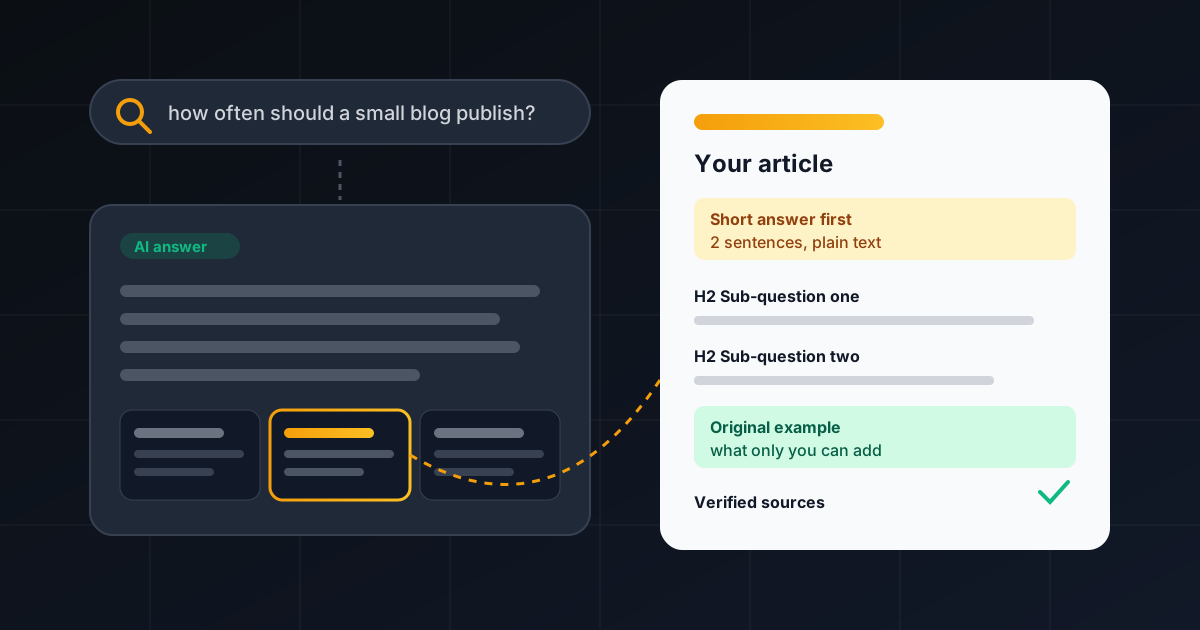
The Short Answer
To write content for AI Overviews and AI Mode, write a genuinely helpful page for a specific question, make sure it can be crawled, indexed and shown with a snippet, put the important information in plain text, and back it up with original detail that other pages do not have. You do not need an AI text file, a special markup format or a separate "AI version" of the article. Then measure the result in the normal Search Console Performance report, because that is where these clicks are counted.
What Google Has Actually Confirmed
Google's AI features page is short, and it is worth reading in full. The points that matter most for writers:
- Eligibility is the same as a normal snippet. To be shown as a supporting link, a page "must be indexed and eligible to be shown in Google Search with a snippet." There are no additional technical requirements.
- No special files or schema. Google states that you don't need to create "new machine readable files, AI text files, or markup" to appear, and there is "no special schema.org structured data" you need to add.
- Answers can draw on many searches. Both features may use a "query fan-out" technique, issuing related searches across subtopics to build a response. That means a page can be useful for a sub-question, not only for the head keyword.
- AI Overviews often don't appear. Google says they are only shown when its systems decide they add something beyond classic results, "and as such, often don't trigger."
- Nothing is guaranteed. Meeting every requirement does not mean Google will crawl, index or serve a page.
Read together, these points say: there is no side door. Your best lever is the quality and clarity of the page itself.
Myths You Can Safely Skip
Because the features are new, a lot of advice is guesswork. Based on Google's documentation, you can drop these from your to-do list for Google Search:
- "You need an AI text file." Google explicitly says AI text files are not needed to appear in its AI features. Other services may handle such files differently, but for Google Search this is not a requirement.
- "Add AI schema." There is no special structured data for AI Overviews. Structured data still matters in the normal way, and Google asks that it match the visible text on the page.
- "Write separate content for AI." The eligibility rules are the same as for a regular search snippet. One good page serves both.
A Writing Process That Fits How AI Answers Work
The steps below are our editorial approach rather than anything Google prescribes. Each one is tied back to something Google has documented, so you are not betting on a rumour.
1. Start from the real question, then list the sub-questions
Because AI Mode and AI Overviews can break a query into subtopics, think beyond the main keyword. Write down the question your reader typed, then the three to six follow-up questions they would ask next. For a post on "content calendar for a small blog," those might be: how often to publish, what to plan first, which tool to use, and how to handle slow weeks. Each one becomes a clearly labelled section.
2. Answer first, then explain
Open each section with a direct one- or two-sentence answer, then add the reasoning, examples and caveats. This is good writing anyway: readers skim headings looking for their exact question. It also gives Search a clean passage that matches the sub-question, without you having to game anything.
3. Add what only you can add
Google's helpful content guidance asks whether a page provides "original information, reporting, research, or analysis" and whether it offers "insightful analysis or interesting information that is beyond the obvious." An AI answer can summarise the obvious points from many pages. The page it links to needs to give the reader a reason to click: a worked example, a template, a screenshot of a real setting, a comparison you actually ran, or a mistake you made and fixed.
4. Be precise with facts and names
Vague statements are easy to blend into any answer and hard to trust. Use exact names for features, plan tiers and policies, link the source, and say when you checked it. If a claim cannot be verified, cut it. Our guide on how to fact-check AI-generated content walks through a claim-by-claim review you can reuse here.
5. Write a heading and title that describe, not tease
Google's self-assessment questions include whether the main heading or title gives "a descriptive, helpful summary of the content" and whether it avoids "exaggerating or being shocking in nature." A heading like "How often should a small blog publish?" is far more useful to a reader scanning a long page than "The surprising truth about frequency."
6. Support the text with real images
Google recommends supporting text with high-quality images and videos "when applicable." Use visuals that explain something: a diagram of your process, a labelled screenshot, a chart from your own data. Give each one descriptive alt text, and keep the key information in the text too.
7. Link the page into your site
Internal links are on Google's list of SEO fundamentals that still apply to AI features. Link new posts from related older ones, and from your blog index, so they are easy to discover. If you are not sure where to start, our SEO content writing guide for beginners covers headings, internal links and on-page basics.
Technical Checks Before You Hit Publish
Writing quality only matters if the page can be shown. A quick pre-publish check, all drawn from Google's AI features page and its snippet documentation:
- Crawling is allowed in robots.txt, and not blocked by your CDN or hosting setup.
- The page is indexable, with no noindex tag left over from staging, and the important content is available as text.
- Snippets aren't blocked. The snippet controls nosnippet, max-snippet and data-nosnippet limit what Google can show. Google's AI features page names these same controls as the way to limit what appears from your pages in Search. Use them on purpose, never by accident.
- Structured data matches the visible text. If your schema says one thing and the page says another, fix the mismatch.
- The meta description is unique. Google says identical or similar descriptions across many pages aren't helpful, and recommends a description that accurately describes the specific page.
How to Measure Results
There is no separate AI Overviews report to wait for. According to Google, traffic from AI features is included in the Search Console Performance report under the "Web" search type. The Search Console help page on performance data adds the details:
- Clicking a link to an external page in an AI Overview or in AI Mode counts as a click.
- An AI Overview occupies a single position, and all links inside it get that same position.
- A follow-up question in AI Mode is treated as a new query, with its own impressions, clicks and positions.
Because AI features are blended into normal search data, watch trends rather than a single number. Look at the queries a post receives, see whether clicks and engagement improve after you rewrite a section, and pair Search Console with your analytics to check time on page and conversions. Google says that people who click from results pages with AI Overviews tend to spend more time on the site, so engagement is a fair signal to track alongside clicks.
Update What You Already Have
You don't need to rewrite your whole archive. Pick the posts that already get impressions for question-style searches and give them the treatment above: a direct answer near the top, clear sub-question headings, one piece of original detail, verified facts and a fresh check of the technical basics. Our AI content refresh checklist for small website owners is a good companion for that pass, and if you use AI tools in drafting, our overview of AI content and SEO explains where Google draws the line.
FAQ
Do I need an llms.txt or other AI text file to appear in AI Overviews?
No. Google's documentation says you don't need to create new machine-readable files or AI text files to appear in AI Overviews or AI Mode. Other services may treat such files differently, but they are not a Google Search requirement.
Is there special schema markup for AI Overviews?
No. Google states there is no special schema.org structured data you need to add. Keep using structured data where it already fits, and make sure it matches what is visible on the page.
Why doesn't my page show in an AI Overview even though it ranks?
AI Overviews only appear when Google decides they add value beyond classic results, so they often don't trigger at all. Even when they do, links are chosen from many possible pages, and Google says that indexing and serving are never guaranteed.
Can I stop Google from using my content in AI features?
Google points to the same controls used for regular Search: nosnippet, data-nosnippet, max-snippet and noindex limit what is shown, and robots.txt rules for Googlebot control crawling. These also affect your normal search listings, so weigh that trade-off first. Google-Extended is a separate control that relates to AI training and grounding in some of Google's other systems.
How do I know if I'm getting traffic from AI Mode?
Clicks and impressions from AI Overviews and AI Mode are counted in the Search Console Performance report under the Web search type, mixed in with other search traffic. Track query-level trends and on-site engagement rather than looking for a separate total.